
Download Windows7 The Dark Knight Theme – free dark Gotham Windows 7 skin
Overview
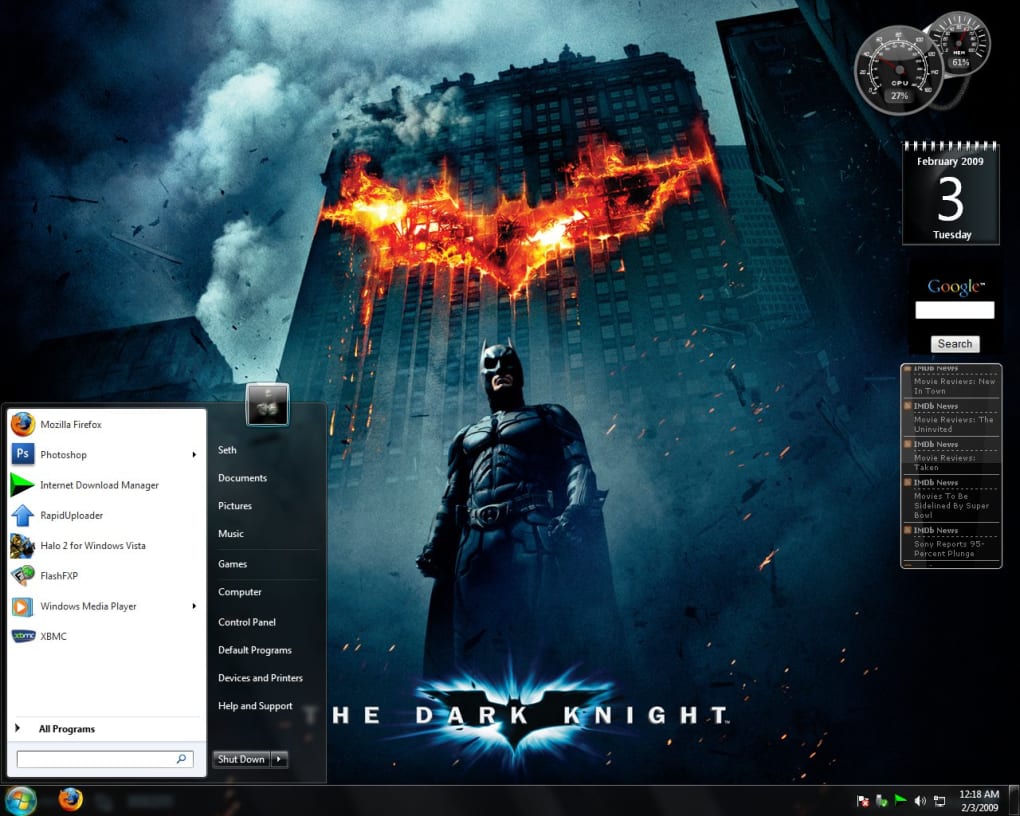
The Windows7 The Dark Knight Theme is a fan‑crafted visual overhaul that brings the brooding atmosphere of Gotham City straight to your Windows 7 desktop. Inspired by Christopher Nolan’s 2008 masterpiece, this free download replaces the default Aero look with a series of high‑resolution backgrounds, custom sound effects, and a full set of Batman‑styled icons. Whether you’re a die‑hard Batman enthusiast or simply love sleek, dark aesthetics, the theme adds a cinematic edge to everyday computing. It includes four dedicated gadgets—such as a Bat‑signal clock and a crime‑reporting widget—that sit on the taskbar, providing both style and functional shortcuts. The theme is designed to be lightweight, ensuring that system performance remains smooth even on older hardware. By installing this theme, you not only personalize your workspace but also get a taste of the iconic Gotham skyline every time you log in. All assets are bundled in a single installer, making the process straightforward for users of any skill level. The theme is completely free, regularly updated by the community, and does not require any additional software purchases. It’s an excellent way to breathe new life into a Windows 7 machine that might otherwise feel dated.
Key Features
- Gotham‑Inspired Wallpapers: Six ultra‑high‑definition images depicting iconic locations such as the Bat‑cave, Wayne Manor, and the rain‑slick streets of Gotham.
- Custom Sound Pack: New login, shutdown, and error sounds taken from the film’s score, providing an immersive auditory experience.
- Batman‑Themed Icons: Replaced system icons for folders, drives, Recycle Bin, and shortcuts, all designed to match the dark aesthetic.
- Four Unique Gadgets: Bat‑signal clock, crime‑reporting ticker, Joker’s laugh alarm, and a utility to toggle night‑mode quickly.
- Seamless Integration: Fully compatible with Windows 7’s Aero theme engine, preserving window transparency and animations.
- Lightweight Installer: The entire package is under 30 MB, ensuring fast download and minimal impact on system resources.
- Free & Open Source: No hidden fees, registration, or ads—just a pure fan‑driven project.
- Regular Community Updates: Bug fixes and new assets are released quarterly based on user feedback.
Installation & Usage Instructions
Installing the Windows7 The Dark Knight Theme is intentionally simple to accommodate both novices and power users. Follow these steps for a hassle‑free setup:
- Download the Installer: Click the “Download Now” button below the article to fetch the latest
DarkKnightTheme_vX.X.zipfile. The download is hosted on a secure server with SSL encryption. - Extract the Archive: Right‑click the zip file and select “Extract All…”. Choose a convenient location, such as
C:\Themes\DarkKnight. - Run the Setup: Inside the extracted folder, locate
InstallTheme.exe. Right‑click and choose “Run as administrator” to grant the installer permission to modify system theme files. - Follow the Wizard: The installer will present a brief wizard. Accept the license agreement, then click “Next”. You’ll be prompted to back up your current theme—highly recommended for easy rollback.
- Select Desired Components: You can choose to install all assets (wallpapers, sounds, icons, gadgets) or pick only specific elements. The default selection installs everything.
- Apply the Theme: Once installation finishes, the theme automatically activates. If it doesn’t, right‑click the desktop, select “Personalize”, and choose “Dark Knight – Gotham” from the list of available themes.
- Configure Gadgets: Open the newly added “Bat‑Signal Gadgets” folder from the Start menu. Drag any gadget onto the taskbar or desktop, then right‑click to adjust settings such as alarm volume or ticker speed.
- Enjoy & Customize: You can further personalize the experience by swapping wallpapers in the
C:\Users\YourName\AppData\Roaming\Microsoft\Windows\Themes\DarkKnightfolder. The theme will automatically detect new images placed there.
Should you encounter any issues, the installer creates a log file (install_log.txt) that can be submitted to the community forum for troubleshooting. Uninstalling is equally easy—simply run UninstallTheme.exe from the same directory, and Windows will revert to your previously saved theme.
Compatibility & System Requirements
The Dark Knight Theme is built specifically for Windows 7 (both 32‑bit and 64‑bit editions). It leverages the native Aero theme engine, meaning that any system capable of running Windows 7’s default visual effects will support the theme without additional patches. Below are the minimum specifications to guarantee smooth operation:
- Processor: 1 GHz or faster (dual‑core recommended for seamless gadget animation).
- RAM: 1 GB (32‑bit) or 2 GB (64‑bit) – the theme itself consumes less than 50 MB of RAM.
- Graphics: DirectX 9 compatible GPU with at least 256 MB VRAM. Integrated graphics from Intel, AMD, or Nvidia are sufficient.
- Disk Space: 100 MB free storage for the theme files and future updates.
- Audio: Any Windows‑compatible sound card for the custom sound pack.
While the theme is optimized for Windows 7, it may also function on Windows 8/8.1 and Windows 10 in “classic” mode, though some Aero‑specific effects (like transparent borders) might appear differently. The theme is not compatible with Windows XP or older operating systems due to reliance on the newer theme API.
For users running Windows 7 Service Pack 1, no additional updates are required. However, keeping your graphics drivers current will ensure that wallpapers render at full resolution and that the animated gadgets run without stutter. If you experience any visual glitches, try disabling third‑party visual enhancement tools (e.g., WindowBlinds) before reinstalling the theme.
Pros and Cons
Pros
- Completely free and legally safe to download.
- High‑quality, cinema‑grade wallpapers that match the film’s tone.
- Custom sound effects add an immersive layer to daily tasks.
- Four functional gadgets provide both aesthetic flair and useful shortcuts.
- Lightweight installer with optional component selection.
- Regular community updates and active support forum.
- Easy rollback to previous theme via built‑in backup.
Cons
- Only compatible with Windows 7; limited support for newer OS versions.
- Some users may find the dark color palette too intense for bright work environments.
- Gadgets rely on the legacy Windows Sidebar, which is deprecated in newer Windows builds.
- No official mobile (Android/iOS) counterpart; the theme is desktop‑only.
- Occasional minor glitches when combined with third‑party visual tweaks.
Frequently Asked Questions
Is the Dark Knight Theme safe to download?
Yes. The theme is hosted on a secure, SSL‑encrypted server and contains no malware or adware. It is a community‑maintained project with source files available for inspection.
Can I use the theme on Windows 10?
The theme was designed for Windows 7. It may run on Windows 10 in classic mode, but some Aero effects and gadgets might not function as intended.
Do I need any additional software to install the theme?
No. The installer includes all necessary files and a lightweight wrapper that works with the built‑in Windows theme engine. Administrator rights are required to apply system‑wide changes.
How can I revert to the default Windows 7 theme?
During installation, the program backs up your current theme. To revert, open UninstallTheme.exe from the installation folder, or manually select “Windows 7 Basic Theme” from the Personalization control panel.
Will the theme affect system performance?
The theme is lightweight (under 30 MB) and does not add significant CPU or memory load. On older hardware, the animated gadgets may cause a slight dip in performance, but overall impact is minimal.
Conclusion & Download CTA
For anyone looking to inject a dose of Gotham‑city grit into their Windows 7 environment, the Windows7 The Dark Knight Theme delivers exactly what fans crave: cinematic visuals, atmospheric sound, and functional gadgets that keep the Bat‑signal shining on your taskbar. Its free nature, straightforward installation, and low system footprint make it an excellent choice for both seasoned Windows power users and newcomers who simply want a fresh look. While the theme is limited to Windows 7, its high‑quality assets and regular community updates ensure that it remains a relevant and enjoyable customization option for years to come.
Download the Dark Knight Theme now – free and secure
The Dark Knight Theme brings a polished, film‑inspired aesthetic to Windows 7 without compromising performance. Its robust feature set, including custom icons, sound effects, and four functional gadgets, offers both visual flair and practical utility. Minor drawbacks—such as limited compatibility with newer OS versions—are outweighed by the theme’s high‑quality assets and active community support.







